

Description
Download Dice Roller App – Chrome Apps, dice, dice roller, game, roll dice, online dice
Overview
The Dice Roller App is a lightweight desktop utility designed for gamers and tabletop enthusiasts who need a reliable, on-the-go dice-rolling solution. It allows users to simulate dice rolls with one to five dice, making it ideal for role-playing games, board games, or any scenario requiring random number generation. The software is built using JavaScript, ensuring broad compatibility across different platforms, including Windows, Mac, and Linux. This cross-platform nature makes it accessible to a wide range of users regardless of their preferred operating system.
While the developer did not provide additional background information, the application’s minimalistic design and focus on core functionality suggest it was created with practicality in mind. The app is particularly useful for players who may not have physical dice available or prefer a digital alternative. Whether used during a live game session or for quick random decisions, the Dice Roller App streamlines the process of generating random outcomes.
Its ability to automatically calculate the sum of rolled dice adds value by reducing manual computation errors. The software operates without requiring installation on most systems due to its web-based architecture, making it easy to access and use immediately after downloading. This feature enhances convenience, especially for users who value speed and simplicity in their gaming tools.
Key Features & Capabilities
- Multiple Dice Selection (1–5): Users can choose to roll between one and five dice at a time, offering flexibility for various game mechanics such as attack rolls, skill checks, or damage calculations.
- Cross-Platform Compatibility: Built with JavaScript, the app functions seamlessly across Windows, Mac, and Linux systems, ensuring consistent performance regardless of the user’s device.
- Automatic Sum Calculation: After rolling, the app instantly computes and displays the total sum of all dice, eliminating the need for manual addition and reducing the chance of errors.
- Instant Roll Functionality: The interface is optimized for quick access, allowing users to roll dice with a single click or tap, enhancing gameplay flow.
- Lightweight Design: At just 500KB, the application requires minimal storage space and loads rapidly, making it suitable for use on older or low-resource devices.
These features make the app particularly effective in real-world scenarios such as online gaming sessions, home-based tabletop events, or solo game play. For example, a Dungeon Master running a campaign can quickly roll dice for monster attacks without needing physical dice. Similarly, a player can simulate a 2d6 roll for a character’s skill check during a remote game night. The app’s simplicity ensures that users can focus on gameplay rather than technical setup.
User Interface, Workflow & Performance
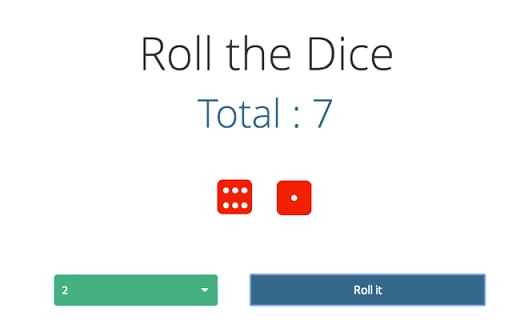
The user interface of the Dice Roller App is clean and intuitive, designed to prioritize speed and ease of use. The main screen displays a central roll button accompanied by visual indicators for the number of dice selected. Users can adjust the dice count using a simple dropdown or numeric input, with immediate visual feedback confirming their choice.
Navigating the app is straightforward, with no complex menus or layered settings. The workflow is linear: select dice, press roll, view result. This minimalistic approach reduces cognitive load and allows users to integrate the tool into their gaming sessions seamlessly. The interface responds instantly to user input, suggesting efficient code implementation and good responsiveness.
Performance observations are based on general software behavior patterns. The developer did not specify resource usage details, but the small file size and web-based nature suggest low CPU and RAM consumption. The app is expected to run smoothly even on older systems, though exact performance metrics were not provided. Stability appears to be a strength given the app’s simple functionality and lack of complex dependencies.
Compatibility & System Requirements
The Dice Roller App is compatible with Windows, Mac, and Linux operating systems, making it accessible to a broad audience across different computing environments. It is designed to run on devices that support JavaScript execution, which includes most modern web browsers.
The application has a file size of 500KB, indicating a lightweight footprint that does not strain system resources. The developer did not provide specific hardware requirements, so exact system specifications remain unclear. Compatibility information was partially provided, focusing on operating system support rather than processor speed, RAM, or graphics capabilities.
Users can expect the app to function without installation on systems where JavaScript is enabled, allowing for quick deployment. This feature enhances accessibility, especially for users who prefer portable or temporary tools.
Pros and Cons
Pros
- Lightweight at only 500KB
- Works across Windows, Mac, and Linux
- Simple and intuitive interface
- Automatic sum calculation for multiple dice
- Free to download and use
Cons
- No offline functionality mentioned
- Exact system requirements not specified
- Limited to 1–5 dice selection
- Developer background not disclosed
- Performance details not provided
FAQ Section
Is the Dice Roller App compatible with all devices?
The app is designed to work on Windows, Mac, and Linux systems. It relies on JavaScript support, so compatibility depends on the device’s browser capabilities.
Is the software secure to use?
As a lightweight utility built with JavaScript, the app does not require installation and runs in a browser environment. No personal data is collected, but users should ensure they download from trusted sources.
Can I use the app without an internet connection?
While the app is web-based, its functionality may require an active internet connection for initial loading. Offline usage is not confirmed.
How often are updates released?
Update frequency was not specified by the developer. Users should check the official source for the latest version.
What license type does the app use?
The app is available for free, but specific licensing terms were not disclosed.
Final Thoughts + CTA
The Dice Roller App delivers a focused, no-frills solution for digital dice rolling. Its cross-platform compatibility, automatic sum calculation, and minimal design make it a practical tool for gamers and tabletop players. While some details like system requirements and offline functionality are not fully documented, the app’s simplicity and free access enhance its appeal. It is particularly well-suited for casual and serious gamers alike who need a reliable, instant dice roll without the hassle of physical dice.
Download Dice Roller App now
Guides & Tutorials for Virtual Dice Rolling App for Chrome
How to install Virtual Dice Rolling App for Chrome
- Click the Preview / Download button above.
- Once redirected, accept the terms and click Install.
- Wait for the Virtual Dice Rolling App for Chrome download to finish on your device.
How to use Virtual Dice Rolling App for Chrome
This software is primarily used for its core features described above. Open the app after installation to explore its capabilities.
User Reviews for Virtual Dice Rolling App for Chrome 0
No reviews found





